
LIGHTING UP COMPUTER SCIENCECSUK One launches 5 November.
—days:—hours:—minutes
See what’s coming
A YEAR IN THE MAKING

A new chapter.
A brighter spark.

Everything a Computer Science student or educator needs, coming together in one connected place.

For the past year, I’ve been rebuilding CSUK from the ground up. On 5 November 2026, I’m excited to share it with you.

Watch your first look at CSUK One
BUILT AROUND TEACHING AND LEARNING

Familiar favourites. New possibilities.

Courses, reimagined

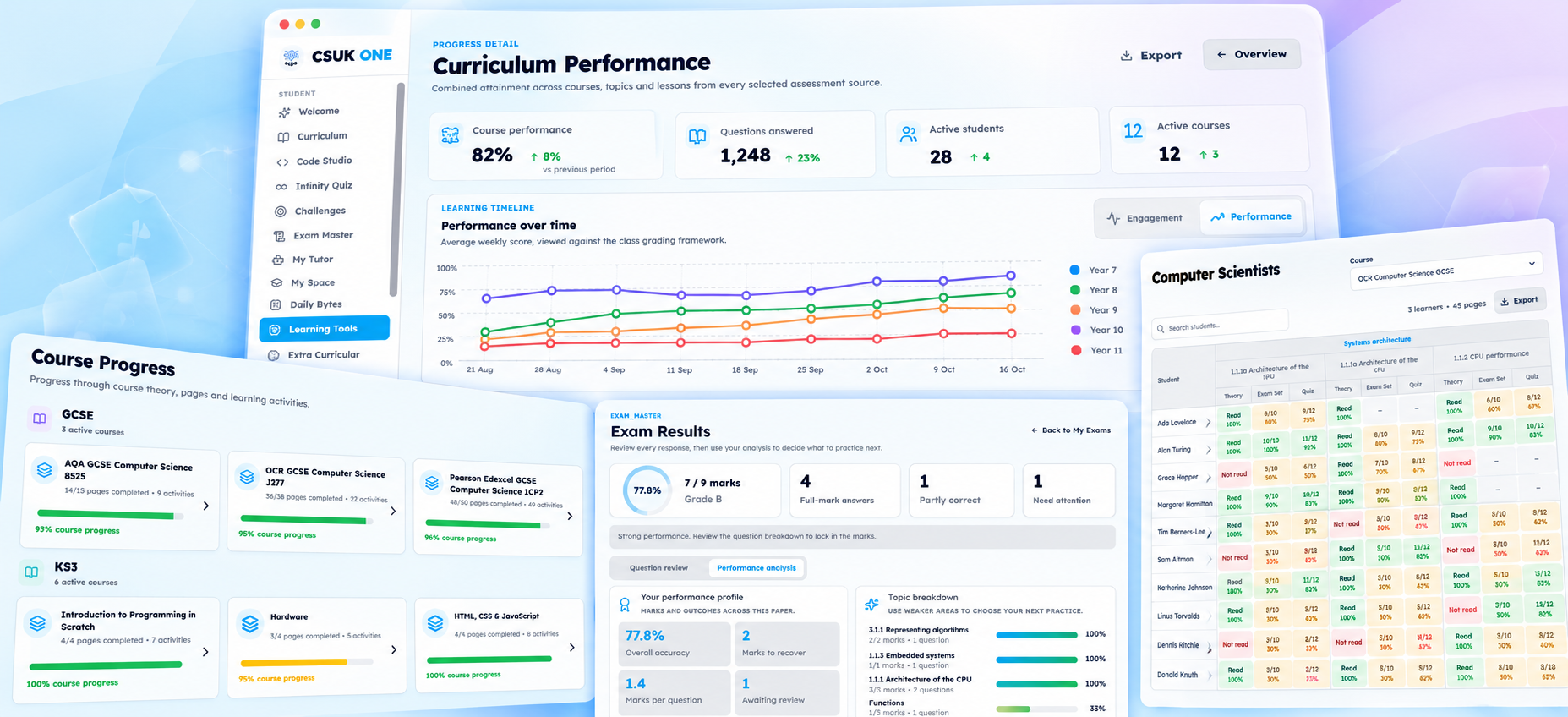
Rewritten courses, quizzes, assessments and a student workspace for notes and AI explanations.

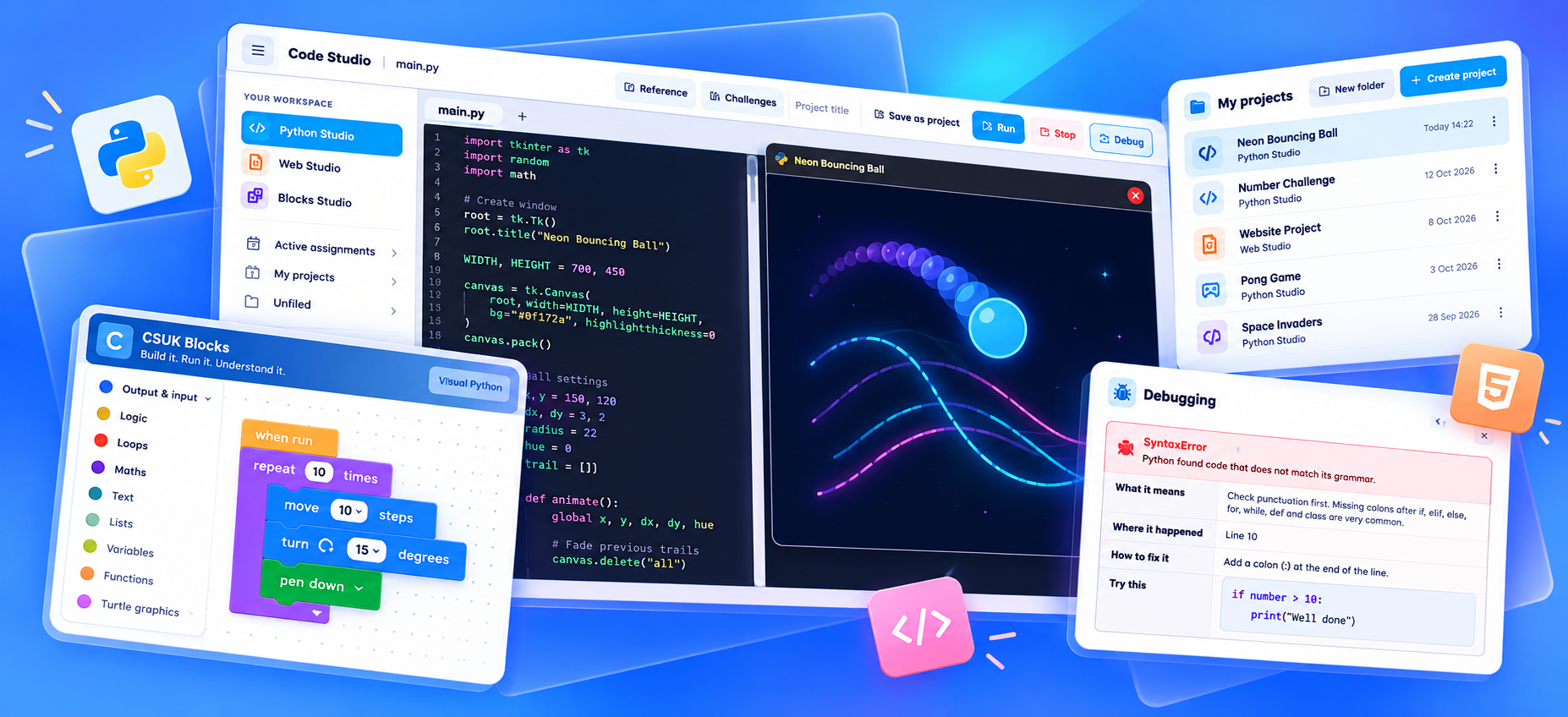
Code Studio & challenges

Python, HTML and blocks. New Parsons, debugging and ordering challenges, with optional AI marking.

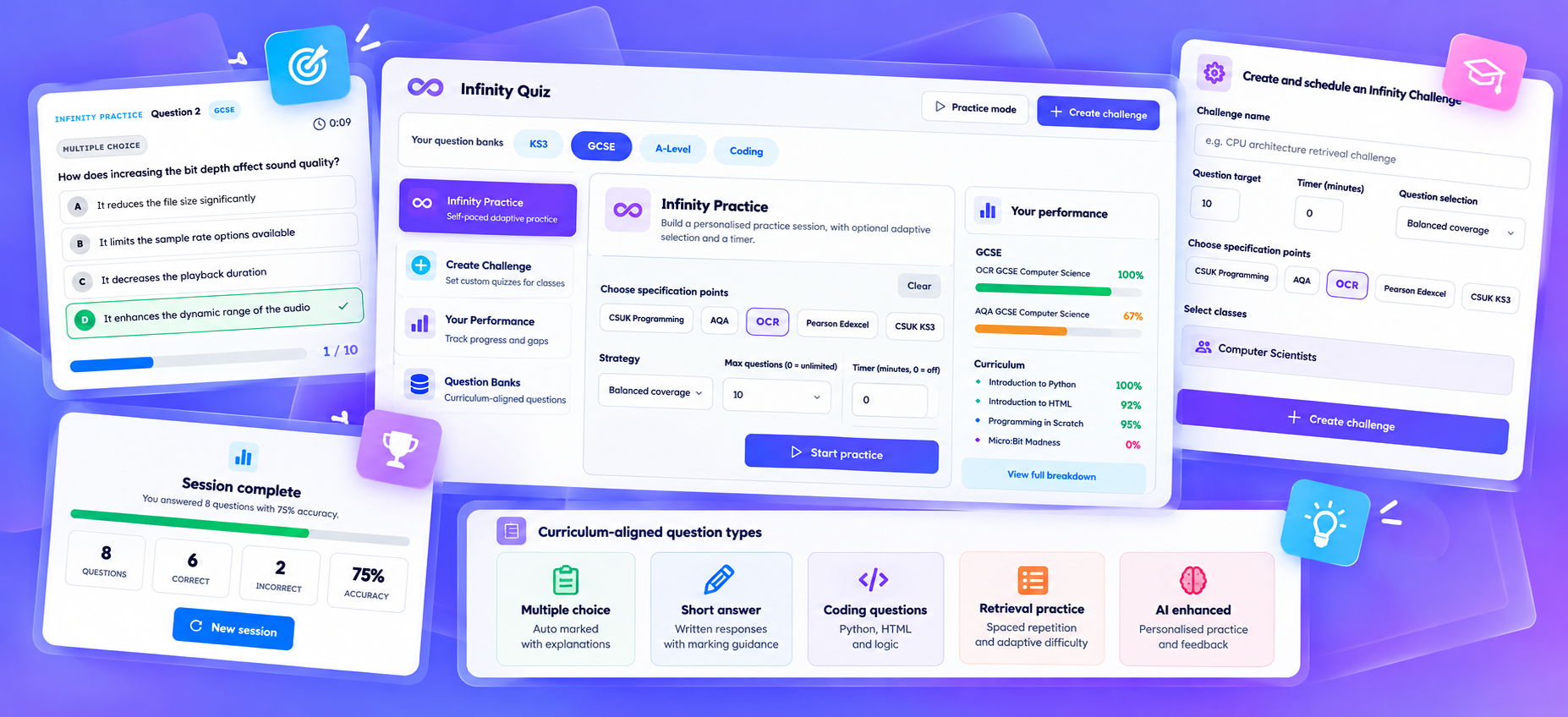
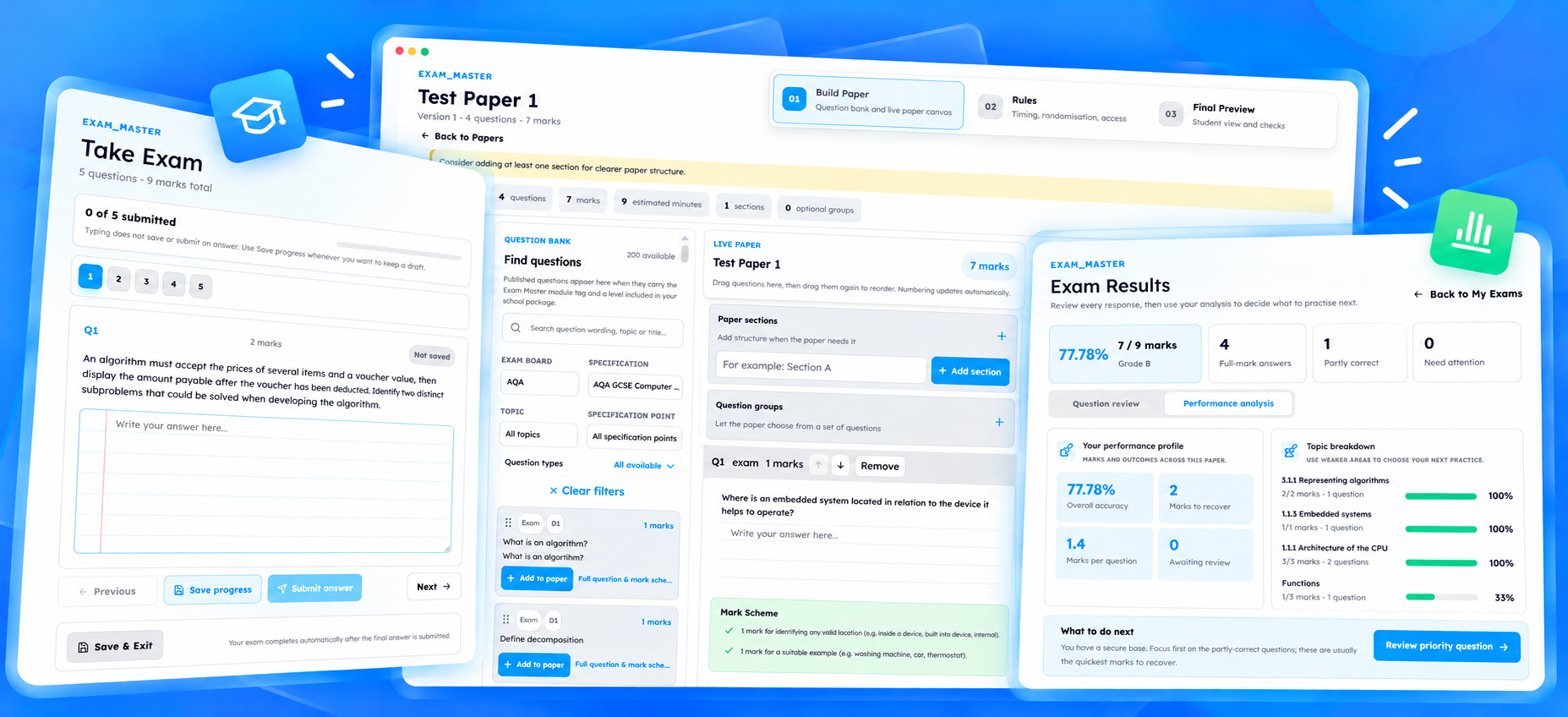
Infinity Quiz & Exam Master

Adaptive practice and redesigned assessment tools, with an integrated coding environment.

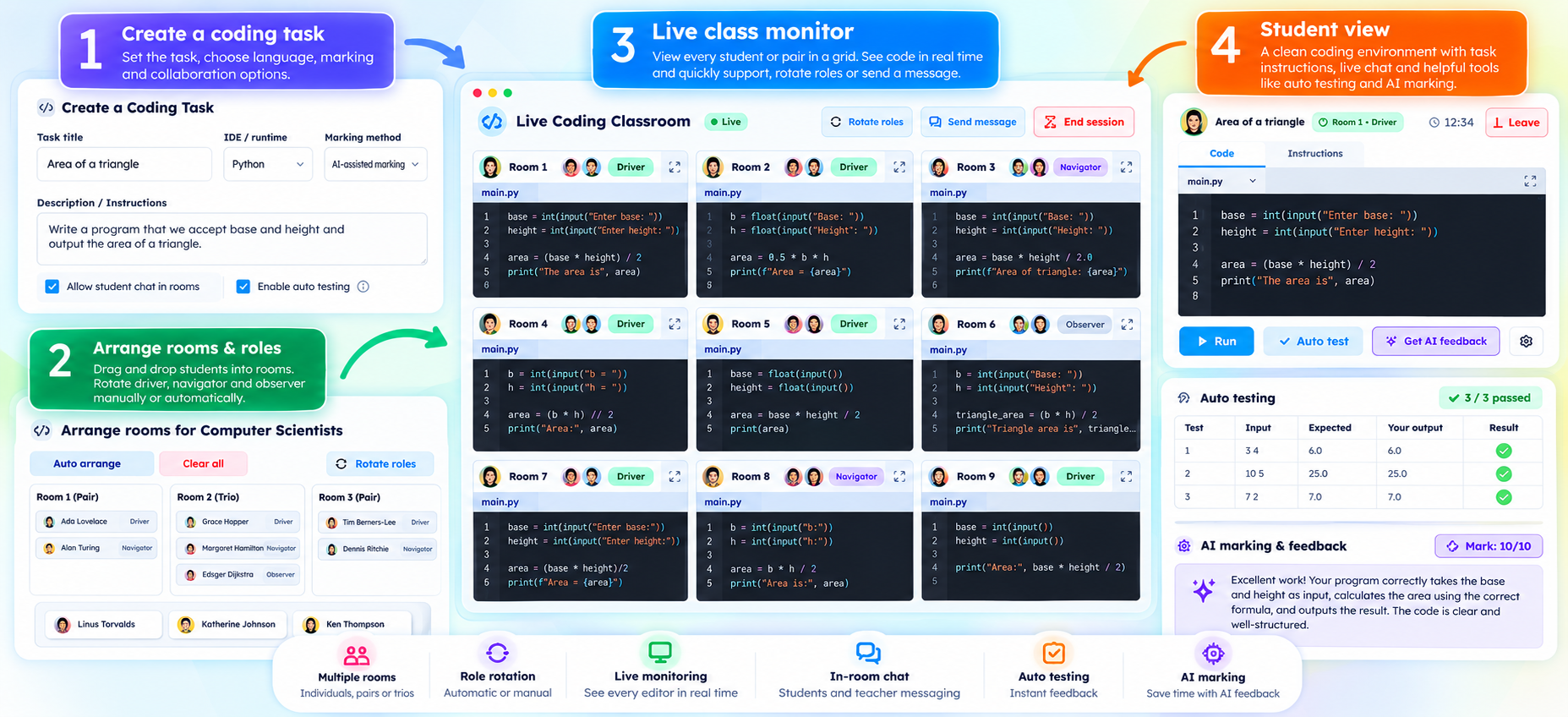
Live learning, together

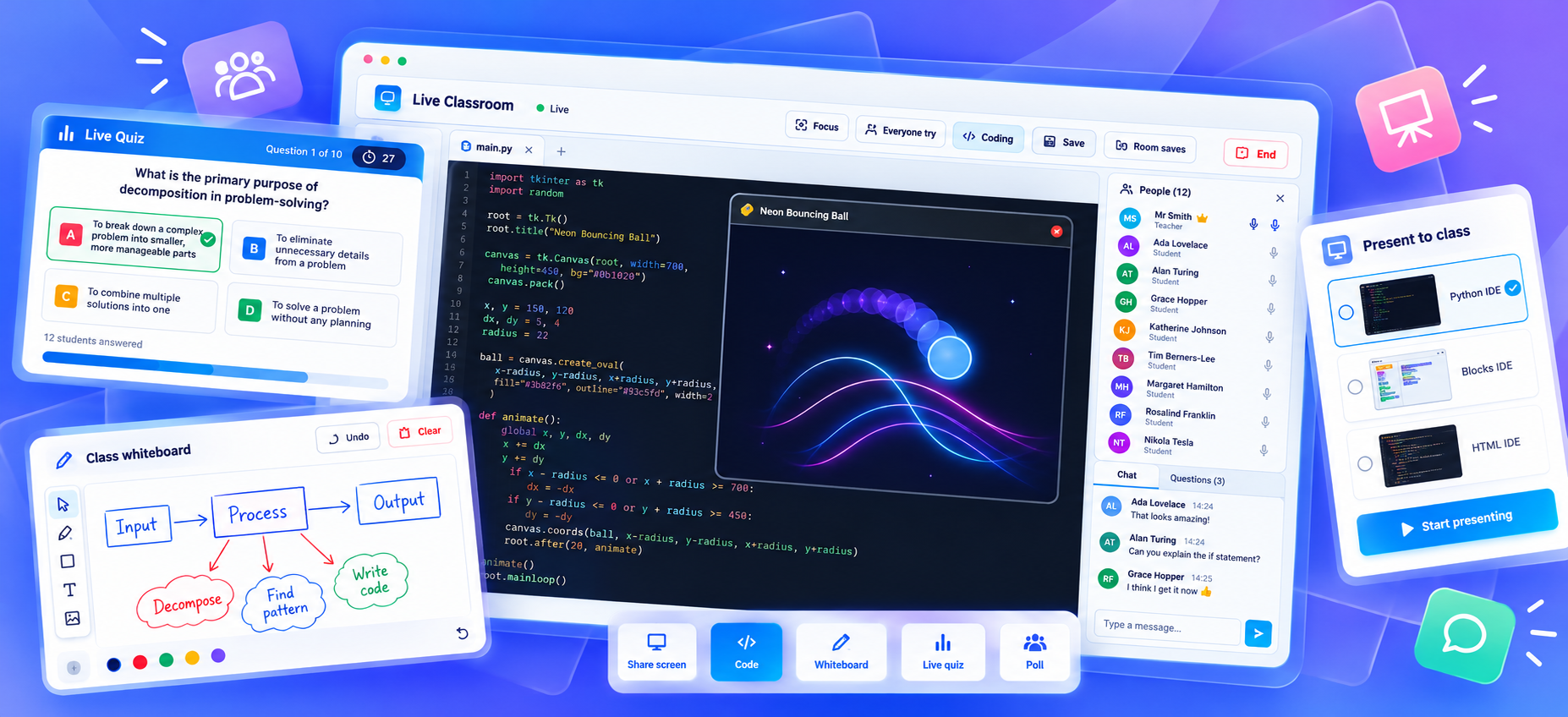
Collaborative Coding Rooms and a Live Classroom with demonstrations, a whiteboard, polls and more.

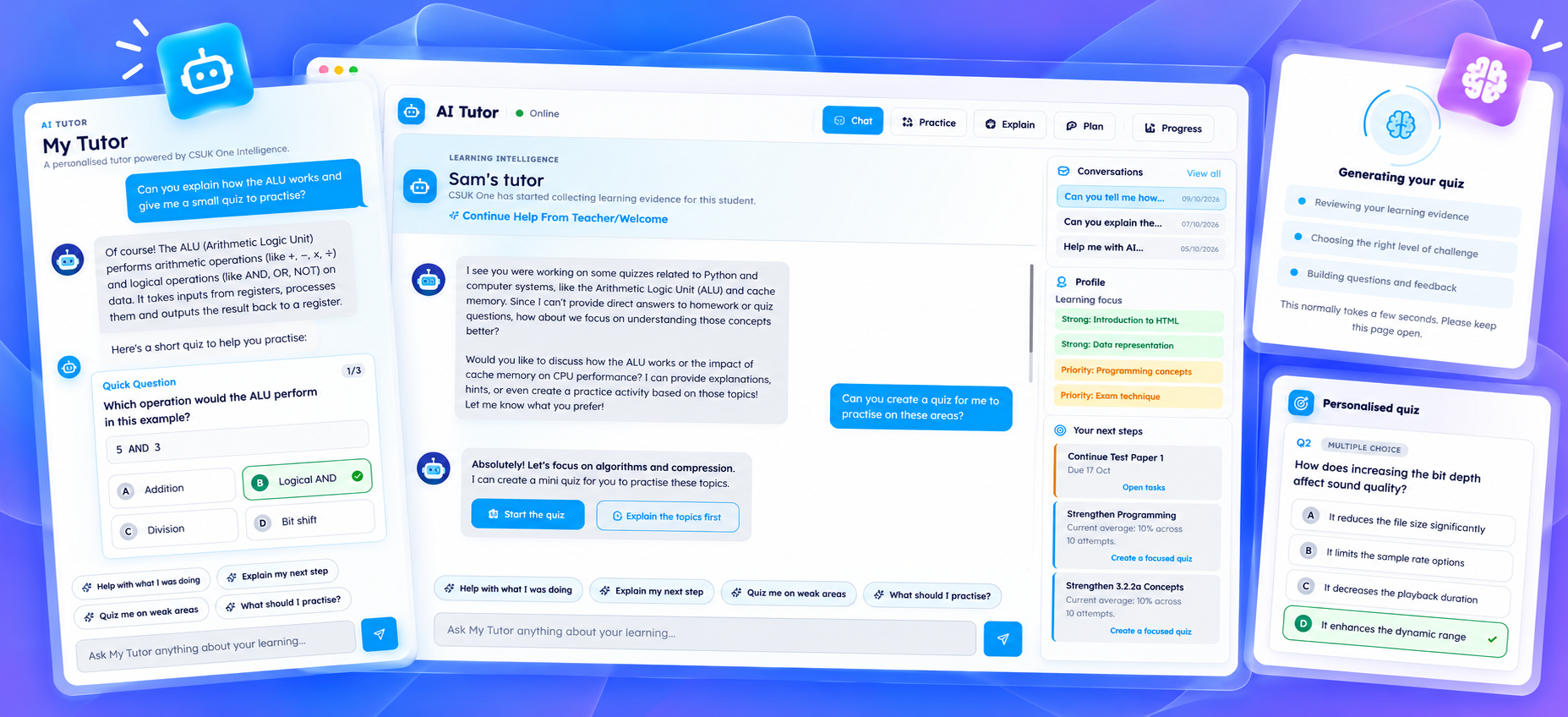
A personal AI tutor

Guidance informed by each student’s activity and progress, building an understanding of their learning over time.

Daily practice & learning tools

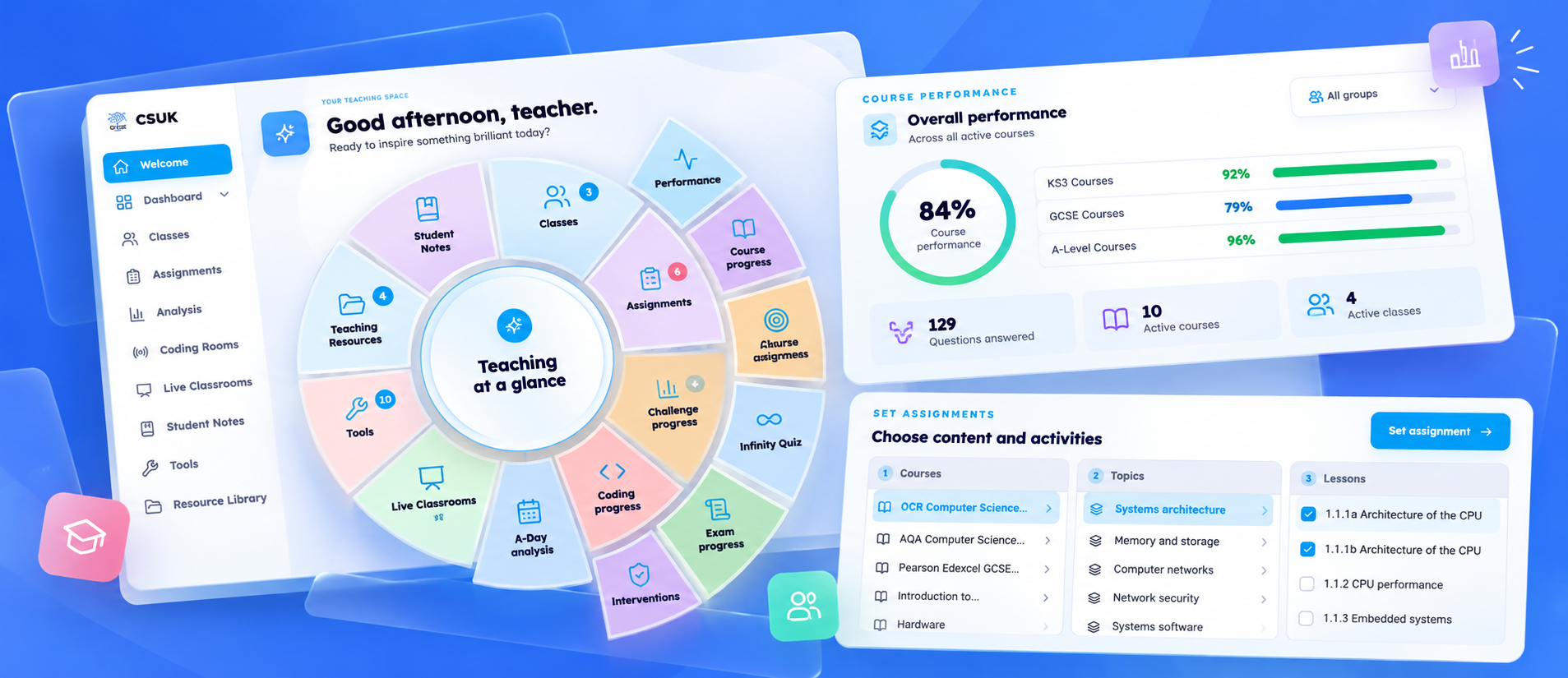
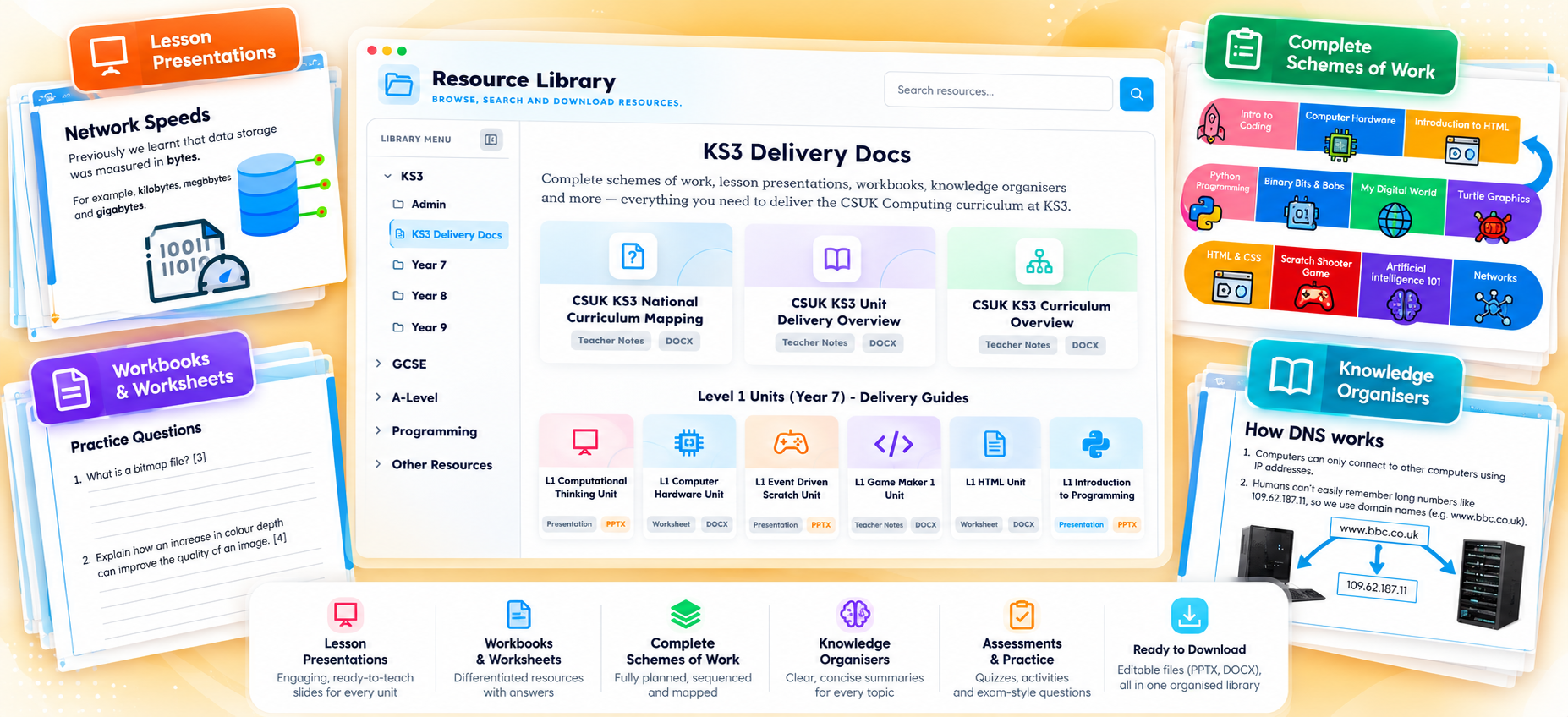
Daily Bytes, Algorithm-a-Day, Type-a-Day and interactive tools — alongside teaching resources and progress reporting.

YOUR INVITATION TO THE COUNTDOWN

Don’t just watch the launch.
Be part of it.

I’ll be announcing giveaways exclusively on CSUK’s social channels in the run-up to launch.

Early access
for selected current customers
Loyalty discount prizes
for existing customers
New customer prizes
discounts to get you started

Giveaways will only be announced on social media.
Choose your favourite channel below and follow CSUK so you don’t miss your chance.

Eligibility, closing dates and entry details will be included in each giveaway announcement.

TAKE A CLOSER LOOK

Your guides to what’s next.

ALREADY PART OF CSUK?

Your membership comes with you.

CSUK One will recognise your active memberships and unlock the equivalent areas for the remainder of your membership. You won’t need to buy those areas again.

Bring your class lists

A straightforward transfer process will save you setting up every student again.

Begin a fresh learning record

Student progress and previous results won’t transfer, because the courses and assessment tools have been rebuilt.

Move when you’re ready

The existing platforms will continue during an extended transition. Finish current courses where they are, or move classes across when it suits you.

Explore memberships & renewals ↗
THE NEXT CHAPTER OF CSUK

Remember,
remember…
5 November.

CSUK One launches 5 November 2026.

Teaching. Learning. Coding. Assessment.
One connected platform.

—days:—hours:—minutes
FOLLOW FOR THE LAUNCH GIVEAWAYS

The countdown has its perks.

Early access for selected current customers. Loyalty discount prizes. New customer discount prizes.

Only on social media. Follow CSUK for the prize announcements and details of how to enter.

Your active memberships will unlock equivalent areas. Existing platforms will continue during the transition.

THE NEXT CHAPTER OF CSUK

CSUK One
Computer Science.
All in One.

Everything you need to learn, create and succeed in Computer Science - all in one place. From interactive lessons and coding to personalised support, teaching tools and progress tracking.

Built for students, teachers, tutors and home educators.
1,750+ Registered Schools Worldwide
75,000+ Registered Users
CSUK ONE 01 / 12
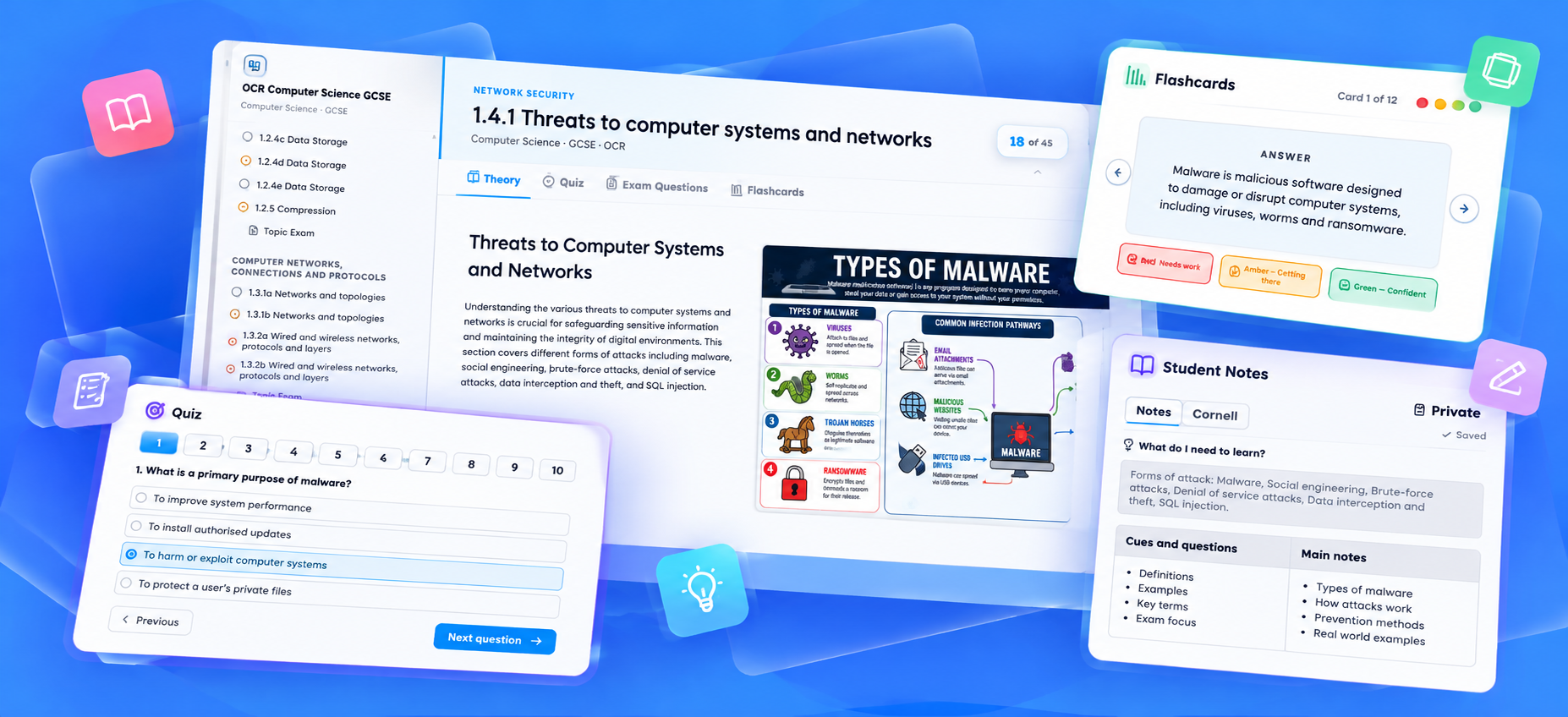
CSUK One interactive courses featuring theory, quizzes, exam questions, flashcards and student notes
LEARN · UNDERSTAND · REFLECT

Interactive courses

Theory, student notes and AI explanations.
Explore the connected CSUK One experience
YOUR FREE COMPUTER SCIENCE WORKSPACE

Seriously powerful.
Completely free.

Start learning, coding and exploring with a complete collection of free Computer Science tools. Build projects, practise something new every day and bring tricky concepts to life, all in one connected workspace.

✓No paid membership required. Just create your free account and get started.
Create your free account →
Daily practiceCode Studio24 learning toolsSaved projects
Daily Bytes practice interface
CSUK One Code Studio
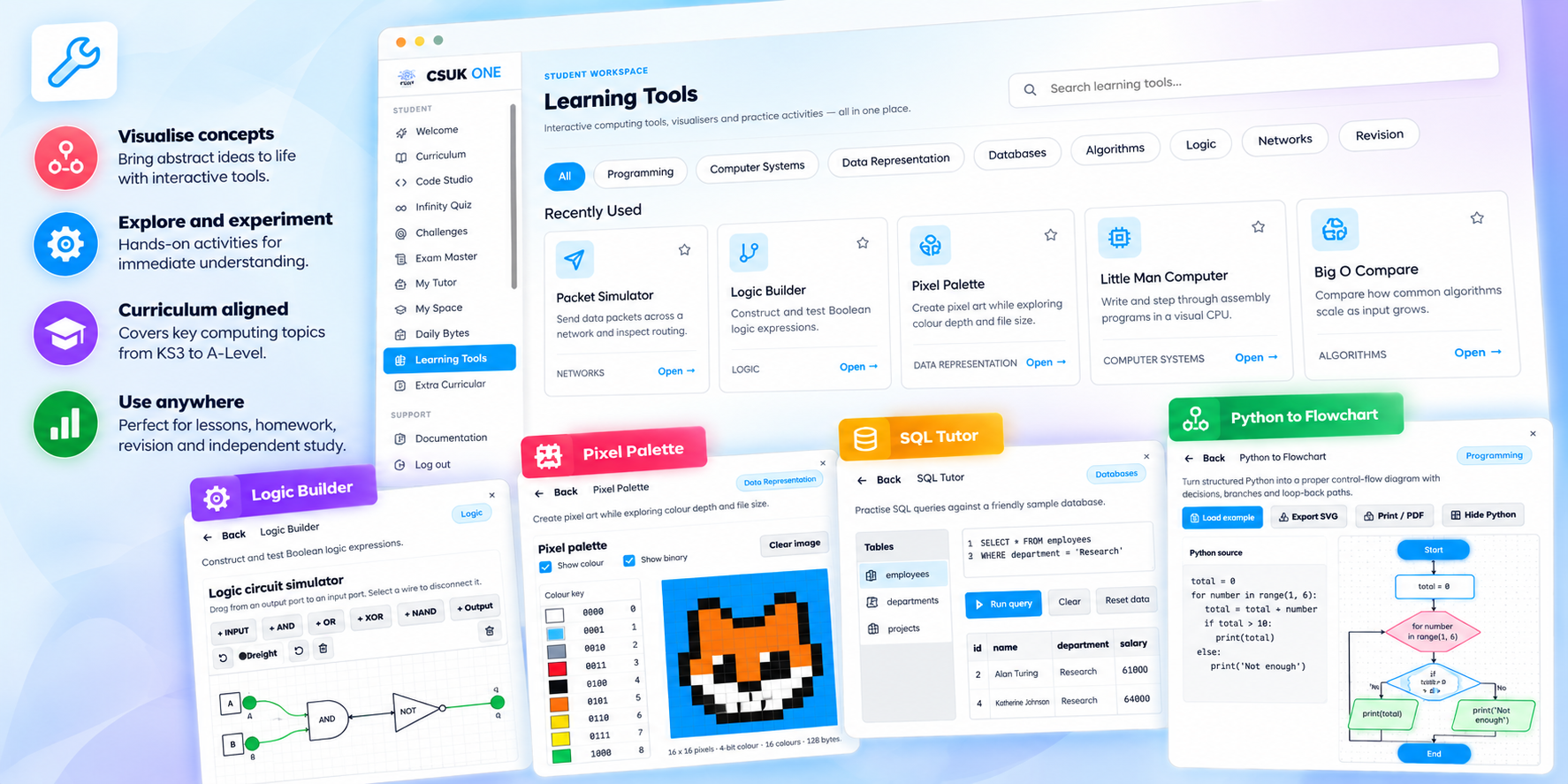
Interactive Computer Science learning tools
£0 A proper place to begin
THREE REASONS TO START TODAY

Practise. Create. Explore.

Three substantial experiences, connected by one free account.

01 PRACTISE EVERY DAY

Small daily challenges.
Big learning benefits.

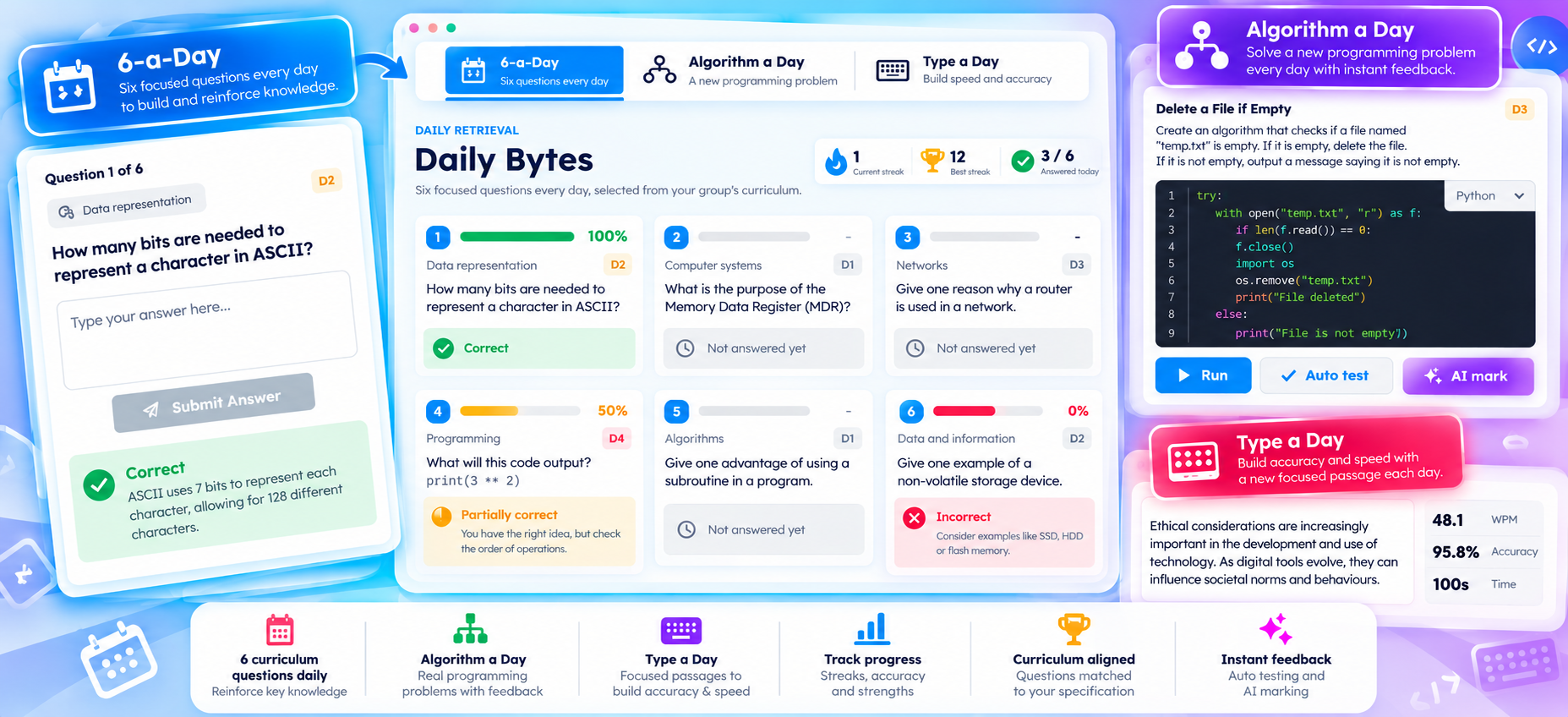
Build knowledge, sharpen programming skills and improve typing with three focused activities. A few useful minutes each day can make a real difference.

6-a-DayAlgorithm a DayType a DayInstant feedbackProgress insights
A reason to return every dayDaily Bytes showing 6-a-Day, Algorithm a Day and Type a Day
TRY A QUICK QUESTIONHow many bits are in one byte?

Choose an answer for instant feedback.

02 CREATE WITHOUT LIMITS

Your ideas deserve a proper coding studio.

Write, run, debug and experiment in a powerful browser workspace. Start with Python, build for the web or develop programming logic with visual blocks.

Python StudioHTML & CSSBlocks StudioProgram outputSaved projects
Build, run and keep your workPython, HTML and Blocks workspaces in Code Studio
main.py
Press Run to preview the supplied example.
03 EXPLORE AND DISCOVER

Do not just learn how computers work. See it happen.

Turn abstract concepts into something you can explore, manipulate and understand with 24 interactive learning tools and visualisers.

Little Man ComputerStep through instructions and watch the processor state change.
Computing concepts you can touchCollection of interactive Computer Science learning tools
LMCLogic BuilderSQL TutorPixel PaletteBig OPacket SimulatorFlowcharts
A WORKSPACE FOR EVERY STARTING POINT

Learn independently. Or bring learners with you.

◎LEARNING INDEPENDENTLY?

Your workspace. Your pace.

Build a daily routine, create personal coding projects and explore interactive tools whenever curiosity strikes.

  • Daily Computer Science practice
  • Python, HTML and Blocks coding
  • Saved personal projects
  • Learning tools and extracurricular exploration
Create your free learner account →
◇TEACHING OR SUPPORTING LEARNERS?

Bring your learners together. For free.

Create classes or groups, use the free daily activities and gain useful visibility of participation and progress.

  • Create and manage classes or groups
  • Enrol and support learners
  • Daily Bytes analysis
  • Free Code Studio and learning tools
Explore free educator access →
ALL THIS. FREE.

Your next great idea starts here.

Daily challenges. A powerful coding studio. Interactive learning tools. A place to explore, practise and create. It is all waiting inside your free CSUK One account.

No trial. Start free and add more only when you need it.
CSUK ONE / Your free Computer Science workspace
EXPLORE WHAT IS INCLUDED

Everything below is included free.

Practise, create, explore and bring learners together inside one connected workspace.

CSUK ONE / Free workspace
Included with your free account
YOUR WAY INTO CSUK ONE

One platform. Your way.

Start with powerful free tools, then discover the courses, teaching features and learning experiences designed for you

CSUK ONE / Memberships
✦ DISCOVER WHAT'S POSSIBLE

One platform.
So many possibilities.

From your first line of code to a fully connected classroom, discover the experiences that make Computer Science come alive.

EXPLORE CSUK ONE01 / 12
Interactive CSUK One courses with quizzes, flashcards and notes
LEARN01 / FEATURE

Learning that goes beyond reading.

Interactive courses combine clear explanations with quizzes, exam questions, flashcards and personal notes — helping knowledge turn into understanding.

✓Structured KS3, GCSE and A-Level learning
✓Quizzes, exam questions and flashcards
✓Student notes and progress tracking
Select any feature below to explore
THE PLATFORM AT A GLANCE

What would you like to explore?

12 connected experiences
✦ One connected workspace for learning, coding, teaching and progress. Features available depend on your account and membership.
Teaching with CSUK One?For teachers and tutors
YOUR LIVE TEACHING SPACE

From watching to doing. Together.

For teachers and tutors who want to make Computer Science feel truly live. Broadcast your code, spark discussions, check understanding and bring every learner into the action. Then move seamlessly into coding rooms, watch ideas develop and showcase great work.

Live IDE broadcastingInteractive whiteboardLive quizzes & pollsReal-time coding rooms
CSUK ONE / Live Classroom
THE CONNECTED COMPUTER SCIENCE CLASSROOM

A lesson they’re part of.

Transform Computer Science teaching into a shared, interactive experience. Demonstrate live, question confidently, guide practical work and keep every learner connected.

Teach and demonstrate in real timeMake every student an active participantMove seamlessly into independent coding
Live Classroom promotional overview
Live Classroom experience
INTERACTIVE PRODUCT TOUR

Step inside a Live Classroom.

Try the lesson tools from both sides of the classroom. Everything here is a fictional, local demonstration and resets when you leave.

Year 9 Computer Science 24 learners connected · Demonstration
STEP 1 OF 6Broadcast your codeModel a solution live, then let the class try it themselves.
Teacher IDE
main.py
when run clicked
set score to
if score ≥ 50 then
print “Level unlocked!”
Program output
Press Run to execute this local example.
Algorithm whiteboard
Draw here. Nothing is uploaded or saved.
Quick questionLIVE · DEMO
CHECK UNDERSTANDING

Which loop is best when the number of repetitions is known?

Choose an answer as a student.

SIMULATED CLASS RESPONSES
Live class quizQuestion 1 of 3
20seconds
PYTHON

Select an answer to reveal the class response.
Coding room overview4 FICTIONAL LEARNERS
VIEWING ROOMAmira
Watching locally. No real room is connected.
Local demonstration onlyTeacher IDE readyNo login · No saving · No live connection
ONE CONNECTED LESSON

One lesson. Six moments that move learning forward.

Follow the teaching flow from your first demonstration to a shared class review, without losing your learners or the learning thread.

01
DEMONSTRATE

Your code. Their screens. Instantly.

Show every student exactly how a program develops, line by line, as you write and run it. Broadcast Python, HTML or Blocks directly to connected learners.

ILLUSTRATIVE TEACHER BROADCAST
02
EXPLAIN & ENGAGE

Make every explanation interactive.

Illustrate algorithms, trace program flow and respond to questions using the whiteboard, class chat and presence tools.

AJMClass connected
INPUT?
Can we trace the loop once more?
03
CHECK UNDERSTANDING

Know what they understand. While you’re teaching.

Ask a quick question, launch a poll or run a class quiz. See responses immediately and uncover misconceptions before moving on.

ILLUSTRATIVE QUICK CHECKWhich loop is best when the number of repetitions is known?

Choose an answer to preview the class interaction.

72% FOR18% WHILE10% OTHER
04
LET THEM CODE

From demonstration to independent practice in moments.

Send learners into coding rooms, see work developing and offer timely help while students remain responsible for their own solutions.

ILLUSTRATIVE CODING ROOM OVERVIEW

Select a room to preview teacher support.

05
SHOWCASE STUDENT THINKING

Turn great student work into a teaching moment.

With appropriate classroom controls, select a learner’s solution and broadcast it to the class. Compare approaches, discuss errors, encourage peer learning and celebrate achievement.

Compare solutionsDiscuss common errorsCelebrate progress
Student view
def valid_score(score):
    return 0 <= score <= 100
Visible to the teacher
06
BRING EVERYONE BACK

One connected lesson. From start to finish.

Return to your IDE or whiteboard, draw together what the class discovered and extend the learning with a final explanation or challenge.

CODING ROOMS→TEACHER IDE→CLASS REVIEWEveryone returns to the shared teaching view
BUILT FOR COMPUTER SCIENCE

Every interaction moves the learning forward.

Not disconnected tools, but one flow from explanation to participation and practical application.

⌨

Live IDE Broadcasting

Show how Python, HTML and Blocks programs develop as you write and run them.

✎

Interactive Whiteboard

Draw diagrams, trace algorithms and make abstract ideas visible.

💬

Live Class Chat

Give questions and discussion a clear place within the shared lesson.

◉

Presence & Participation

See who is connected and whether learners are joining the activity.

?

Quick Questions

Check a key idea before the lesson moves forward.

▥

Live Polls

Collect immediate feedback and expose misconceptions early.

⚡

Live Class Quizzes

Create quiz-style questions, gather responses and reveal results together.

↗

Coding Breakout Rooms

Move students from watching a demonstration to writing their own solutions.

⌁

Real-Time Observation

Watch practical work develop and offer support at the right moment.

★

Student Work Broadcasting

Turn a learner’s solution into a whole-class learning opportunity.

↩

Seamless Teacher Control

Return everyone to your IDE or whiteboard and continue the lesson.

LIVE CLASSROOM

Don’t just deliver a lesson. Bring everyone into it.

From your first explanation to the final challenge, Live Classroom connects teaching, questioning, coding and collaboration in one seamless experience.

Explore Schools & Teachers membership Live Classroom requires an applicable paid membership.

Don't just take our word for it.

For over a decade, educators have trusted CSUK to help them teach Computer Science. Their words tell the story better than we ever could.

✦Trusted by educators since 2015Real feedback from our established CSUK platforms
“CLASSROOM IMPACT

Using CSUK has made a great impact to my teaching and maximised students' engagement in my lessons.

Ambrose KoromaLanfranc
“TEACHER RECOMMENDED

I can hand on heart say it is the best money I have spent when it comes to teaching/planning.

David MarleyAcklam Grange School
✳
More than a few kind words.

Explore 61 testimonials from teachers and learners across the CSUK family.

THE PEOPLE BEHIND THE FEEDBACK

Real voices. Real experiences.

Feedback from teachers and learners who have used CSUK’s established teaching resources, ReviseCS and coding platforms.

Recently supplied email feedback is shown first, followed by ReviseCS homepage reviews and earlier CSUK testimonials. The source emails do not include verified dates here; email excerpts should be checked against the originals before public release.
61 testimonialsFeedback on established CSUK platforms, not CSUK One
Thank you to every teacher and learner who has been part of the CSUK journey.
THE STORY BEHIND CSUK ONE

Built by a teacher.
Made for what’s next.

CSUK began in 2015 with a simple idea: give Computer Science teachers the tools and confidence to make every lesson count.

More than a decade later, that idea has grown into something bigger. CSUK One brings learning, coding, assessment and teaching together in one connected home — shaped by the realities of classrooms, not just a software roadmap.

S.Sam WickinsFounder, CSUK · Former Head of Computer Science
EXISTING CSUK CUSTOMERS

Already part of CSUK?
You're in safe hands.

Your current platforms aren’t disappearing overnight. Keep teaching, finish existing courses and explore CSUK One at your own pace.

✓ No immediate change✓ Time to transition
✳ CSUK ONE YOUR TRANSITION GUIDE
FOR OUR EXISTING CSUK COMMUNITY

Your CSUK journey
continues.

CSUK One is the next chapter of everything we've built together. And the most important thing to know? There’s no need to rush.

See how it works
✓
Your existing CSUK platforms remain available during the transition.

Continue with your current classes and work while you get to know CSUK One. We're planning an extended period with both experiences running alongside each other.

What's changing — and what's not.

Your teaching plans matter. That's why this is an evolution you can explore gradually, rather than a sudden switch.

▤

Keep teaching as normal

Continue lessons, assignments and existing groups on the CSUK platforms you already use.

⇄

Explore both side by side

Try CSUK One without having to abandon work already underway elsewhere.

◇

Your membership matters

Qualifying current memberships unlock the corresponding areas of CSUK One.

◷

Move when it suits you

Choose a sensible point to begin new courses and activities on the new platform.

Nothing needs to stop
for something new to begin.

For a transition period, your established CSUK platforms and CSUK One can sit alongside each other.

YOUR CURRENT PLATFORMS

Keep what’s working.

Finish existing teaching sequences, access your current groups and review their work where it was completed.

CONTINUE AS NORMAL ↗
CSUK ONE

Discover what’s next.

Explore the new connected workspace, redesigned learning experiences and tools for teaching and coding.

EXPLORE AT YOUR PACE ↗

A simple way to make the move.

There’s no single right moment to switch. Here's the approach we'd recommend.

01

Carry on with your existing classes.

Finish the units, assessments and assignments already in progress. You don't need to interrupt your teaching.

NOW
02

Take a look around CSUK One.

Explore the connected courses, Code Studio, daily practice and teaching tools available to your account.

WHEN READY
03

Prepare your new classes.

Set up groups and student enrolments in CSUK One, using available class import tools where supported.

NEXT
04

Start fresh learning in the new workspace.

Choose a natural point — such as a new topic, term or class — to begin assigning work in CSUK One.

YOUR PACE
i
One important detail about student progress

Completed student work, historical results and progress from existing CSUK platforms do not automatically transfer into CSUK One. Those records remain on the original platforms during the transition. Importing or recreating a class is different from importing its previous results.

The things you might be wondering.

Do I need to buy another membership to try CSUK One?

Not necessarily. Qualifying existing CSUK memberships are recognised and provide access to corresponding CSUK One areas. The exact features depend on your current membership. The free CSUK One tools are available without purchasing a paid pack.

Will my current classes and assignments still work?

Yes — continue using your current groups, courses and assignments on the existing platforms during the transition. CSUK One is a separate workspace, so you can prepare new groups and activities there without interrupting current work.

Will my students' existing results move across?

No. Historical results, completed activities and progress do not automatically migrate into CSUK One. They remain on the original platform during the transition. Class enrolments may be set up or imported where supported, but this does not bring across assessment history.

When will the older platforms close?

We're planning a long transition with the existing platforms and CSUK One available side by side. We haven't announced a final shutdown date here. Any future changes will be communicated clearly so you have time to plan.

What is CSUK One, exactly?

It's a connected home for CSUK's teaching resources, interactive learning, coding, daily practice, quizzes, exams, progress reporting and classroom tools. Instead of moving between separate CSUK experiences, the aim is to bring the tools you need together in one place. Available areas depend on your account and memberships.

What if I'm not sure what my school has access to?

Get in touch and we'll help you understand your current membership, the corresponding CSUK One access and the best next step for your classes.

“FROM SAM

“I know how much work goes into setting up classes, preparing lessons and supporting students. That's why I want everyone to have the time and space to make this move properly. We'll take this next step together.”

S.Sam WickinsFounder, CSUK
Need a hand with your transition?

We're here to help you work out the best next step.

Contact CSUK

A few questions.
Clear answers.

Whether you're discovering CSUK One for the first time or already part of CSUK, here's what you need to know.

All questions10 answers
01What can I use for free?

Quite a lot! Your free CSUK One workspace includes Daily Bytes (6-a-Day, Algorithm a Day and Type a Day), Python, HTML and Blocks coding environments, saved coding projects, interactive learning tools and extra-curricular activities.

For teachers, the free foundation also supports creating classes, enrolling students and viewing basic progress — so you can get started before choosing any paid packs.

✦ Your free account stays available, even after your full-platform trial ends.
02Can I try the entire platform before buying a pack?

Yes! Once you have created your free account, you can activate a trial of the entire CSUK One platform — whenever you are ready. There is no need to start your trial the moment you sign up, so you can explore the free tools first and choose the right time to experience everything else.

During your trial, you can explore the paid features and discover how CSUK One could support your learning or teaching. When your trial ends, the paid areas become locked again unless you purchase access, but your free account and all the free features remain available. You can carry on using the free platform for as long as you like.

✦ Start your trial when it suits you. Keep your free access afterwards.
03Do I need to install anything?

CSUK One is a browser-based platform. You can access its online learning and teaching workspace through a supported modern web browser, without installing a separate desktop application.

04How do paid packs work?

Paid packs extend your free account with the content and capabilities you need. Schools can choose the curriculum, coding and teaching-resource packs that suit them, rather than having to purchase everything at once.

Explore the audience-specific access options above for current inclusions and pricing. What you can access depends on the packs or membership you hold.

05Can schools add more packs later?

Yes. Schools can start with the areas they need now and add other available packs later as their requirements grow. Different packs unlock different curriculum content, resources and learning experiences.

06Can I join as an individual student?

Yes. CSUK One is designed for independent learners as well as schools. Students can explore the free workspace and choose individual learning access for supported GCSE or A-Level study without requiring a school to buy a membership.

07Can I create accounts for my children?

CSUK One includes a home-educator route designed to help parents support their children's Computer Science learning. Home-educator access provides a limited number of learner accounts, with structured learning, coding and progress visibility according to the chosen membership.

08Can I use CSUK One as a tutor?

Yes. Tutor access is designed for supporting a small number of learners, assigning work and reviewing their progress. Explore the tutor option in the audience section to see the available membership and learner-account allowance.

09What happens to the existing CSUK platforms?

CSUK One is the next evolution of CSUK, bringing teaching resources, coding, courses and assessment together. The existing platforms will continue running alongside CSUK One during an extended transition period.

There's no need to abandon current classes or unfinished courses. You can continue teaching on the existing platforms while exploring CSUK One at your own pace.

10Will my membership, classes and progress move across?

Qualifying existing memberships are recognised for access to the corresponding areas of CSUK One. Class and student enrolments can be set up or imported where supported, but completed student work, assessment history and progress do not automatically transfer.

Keep using your current platforms to finish existing work and move new teaching activities over when you're ready. There's no confirmed deadline for switching.

WE'RE HERE TO HELP

Still have a question?

Can't find what you need? Get in touch and we'll be happy to help.

Get in touch

Your next chapter in
Computer Science
starts here.

One connected place to learn, create, teach and grow. Start with a free account, discover what’s possible, and explore the full CSUK One experience when you’re ready.

Free tools, always available Start your trial when you choose No pressure to upgrade
CSUK ONEOne platform. More possibilities.Back to top ↑
Shopping Cart
Scroll to Top